


Sounding a panic alarm
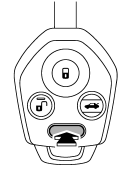
To activate the alarm, press the “PANIC” button once.
The horn will sound and the turn signal lights will flash.
To deactivate the panic alarm, press any button on the remote transmitter. If a button on the remote transmitter is not pressed, the alarm will be deactivated after approximately 30 seconds.
See also:
If the light is blinking
If the light is blinking while driving, an
engine misfire condition has been detected
which may damage the emission
control system.
To prevent serious damage to the emission
control system, y ...
Front seatbelt pretensioners
Front seatbelt pretensioners
The driver’s and front passenger’s seatbelts have a seatbelt pretensioner. The seatbelt pretensioners are designed to be activated in the event of an accident involving a ...
Battery
WARNING
● Before beginning work on or near any battery, be sure to extinguish all cigarettes,
matches, and lighters. Never expose a battery to an open flame or electric sparks.
Batteries gi ...