


Unlocking the doors
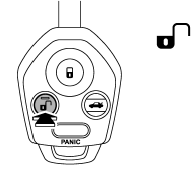
Press the “ ” button to unlock the
driver’s door. An electronic chirp will sound twice and the turn signal lights will
flash twice. To unlock all doors and the rear gate (Outback), briefly press the
“” button a second time within 5 seconds.
NOTE
If the interval between the first and second presses of the “”
button (for unlocking of all of the doors and the rear gate) is extremely short,
the system may not respond.
See also:
Tire rotation
Vehicles equipped with 4 non-unidirectional tires
1) Front
Vehicles equipped with unidirectional tires
1) Front
Tire wear varies from wheel to wheel. To maximize the life of each tire and ensu ...
Stopping the engine
WARNING
Do not stop the engine when the vehicle is moving. This will cause loss of power
to the power steering and the brake booster, making steering and braking more difficult.
It could also res ...
Turning on/off the Hands-free mode
Turning on/off the Hands-free mode
1) OFF hook switch
2) ON hook switch
3) Talk switch
To turn on the Hands-free mode, press the
OFF hook switch . To turn off the
Hands-free mode, press th ...