


Power door locking switches
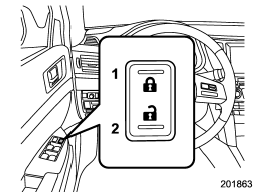
1) Lock
2) Unlock
All doors and the rear gate (Outback) can be locked and unlocked by the power door locking switches located at the driver’s side and the front passenger’s side doors. To lock the doors, press the front side of the switch.
To unlock the doors, press the rear side of the switch.
When you close the doors after you set the door locks, the doors remain locked.
NOTE
Make sure that you do not leave the key inside the vehicle before locking the doors from the outside using the power door locking switches.
See also:
Rear center seatbelt
Rear center seatbelt
1) Center seatbelt tongue plate
2) Connector (tongue)
3) Connector (buckle)
4) Center seatbelt buckle
Fastening the seatbelt with the webbing
twisted can increas ...
Using the Hands-free system
Turning on/off the Hands-free mode
1) OFF hook switch
2) ON hook switch
To turn on the Hands-free mode, press the OFF hook switch
. To turn off the Hands-free mode,
press the ON hook switch .
...
Fuses
Never replace a fuse with one having a higher rating or with material other than a fuse because serious damage or a fire could result.
The fuses are designed to melt during an overload to prevent ...