


Cooling or dehumidifying
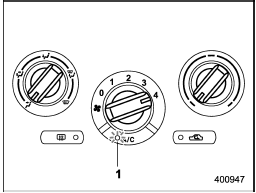
Cooling or dehumidifying
1) ON position
For cooling and dehumidification of the passenger compartment, performing the following steps will allow air to flow through the instrument panel outlets:
1. Set the air inlet selection button to the OFF position.
2. Set the airflow control dial to the “ ” position.
3. Set the air conditioner button to the “ON” position.
4. Set the temperature control dial to the blue side.
5. Set the fan speed control dial at the highest speed.
See also:
R (Reverse)
This position is for backing the vehicle.
To shift from the “N” to “R” position, stop the vehicle completely then move the lever to the “R” position. ...
Fuel gauge
1) Low fuel warning light
The fuel gauge shows the approximate amount of fuel remaining in the tank. When
the ignition switch is in the “LOCK” or “Acc” position, the fuel gauge shows “E”
even i ...
EXTERIOR
The 2011 STi oozes speed. My test vehicle was the new four-door wide-body
sedan with an intimidating-looking rear spoiler intended to amplify the car's
aerodynamics. The spoiler definitely took a ...