


Glove box
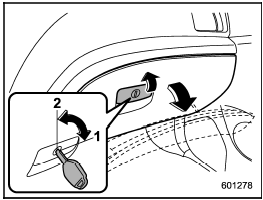
Glove box
1) Lock
2) Unlock
To open the glove box, pull the handle. To close it, push the lid firmly upward.
To lock the glove box, insert the key and turn it clockwise. To unlock the glove box, insert the key and turn it counterclockwise.
See also:
Random playback
To playback a track/index/file(s) at random,
press the “RDM” button for 0.5
second or longer (type C audio)/briefly
(type D audio) while the track/index/file is
playing.
Each time you press ...
Operating the HomeLink® Wireless Control System
Once programmed, the HomeLink® Wireless Control System can be used to remote-control the devices to which its buttons are programmed. To activate a device, simply press the appropriate button.
The in ...
Folder selection
NOTE
- Selecting folders in this way is
possible only within a single disc.
- Only MP3/WMA/AAC folders are recognized
when an attempt to select the
next or previous folder is made. If no
ap ...