


Random playback
Subaru Forester / Subaru Forester Owners Manual / Audio / Bluetooth® audio (type C and D audio) / Bluetooth® audio operation / Random playback
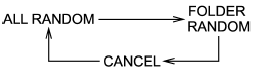
Random playback is operated in the same
way a CD is played. Refer to “Random
playback”. Each time you press the
 button for 0.5 second or longer
(type
C audio)/
button for 0.5 second or longer
(type
C audio)/  button (the “RDM”
button)
briefly (type D audio), the mode changes
in the following sequence.
button (the “RDM”
button)
briefly (type D audio), the mode changes
in the following sequence.
See also:
Fuel
...
Coin tray
Coin tray
A coin tray is built in the center console. ...
Installing a rearward facing child restraint
Installing a rearward facing child restraint
1. Place the child restraint system in the rear seating position.
2. Run the lap and shoulder belt through or around the child restraint system following ...