


XMTM satellite radio reception tips for antenna on the windshield (for U.S.A. only — if equipped)
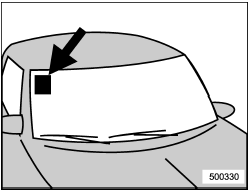
For some models, the satellite radio antenna is fixed to the upper right hand corner of the windshield.
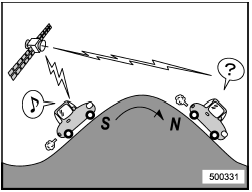
The XMTM satellite radio receiver that is fitted to your vehicle receives the necessary signals from two specially designated satellites that are in a geostationary orbit over the equator. One satellite covers the east coast and the other covers the west coast. Both of them direct their signals north. These signals are then relayed throughout the radio reception area by a network of ground repeater stations. The satellite radio signals are transmitted as “line of sight” signals. The line of sight signals can be blocked by objects such as buildings, but the network of repeater stations allows signal coverage within urban areas such as cities.
You may experience problems in receiving XMTM satellite radio signals in the following situations.
- If you are driving northward in a coastal
area
Because the satellite radio antenna is
located on the windshield, the signal
comes from the south and may not be
able to reach the antenna in some
circumstances when you are driving north.
- If you are driving in a tunnel or a
covered parking area
- If you are driving beneath the top level
of a multi-level freeway
- If you drive under a bridge
- If you are driving next to a tall vehicle
(such as a truck or a bus) that blocks the
signal
- If you are driving in a valley where the
surrounding hills or peaks block the signal
from the south
- If you are driving on a mountain road
where the southern direction is blocked by
mountains
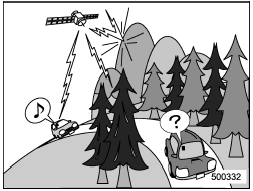
- If you are driving in an area with tall
trees that block the signal (10 m or more),
for example on a road that goes through a
dense forest
- The signal can become weak in some
areas that are not covered by the repeater
station network.
Please note that these may be other unforeseen circumstances when there are problems with the reception of XMTM satellite radio signals.
NOTE
The channel guide is not yet updated if
the update is done while receiving the
XMTM satellite radio signal. To complete
the update, turn the ignition switch to
the “LOCK” position and then to the
“ACC” or “ON” position.
See also:
Driving tips for AWD models
All-Wheel Drive distributes the engine
power to all four wheels. AWD models
provide better traction when driving on
slippery, wet or snow-covered roads and
when moving out of mud, dirt and ...
Security indicator light
Refer to “Security indicator light”. ...
Rear gate – if the rear gate cannot be opened
In the event that you cannot open the rear
gate by operating the power door locking
switches or the remote keyless entry
system, you can open it from inside the
cargo area.
1. Remove the ac ...