


START
The engine is started in this position. The starter cranks the engine to start it. When the key is released (after the engine has started), the key automatically returns to the “ON” position.

Do not turn the ignition switch to the “START” position while the engine is running.
If your registered key fails to start the engine, pull out the key once (the security indicator light will blink), and then insert the key in the ignition switch and turn it to the “START” position and again try to start the engine.
NOTE
The engine may not start in the following
cases:
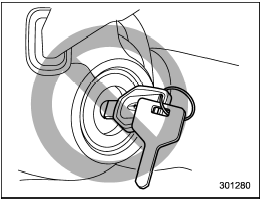
- The key grip is touching another key or a metallic key holder.
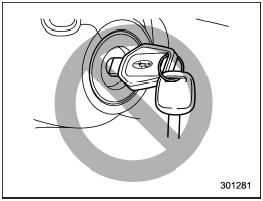
- The key is near another key that contains an immobilizer transponder.
- The key is near or touching another transmitter.
See also:
New vehicle break-in driving – the first 1,000 miles (1,600 km)
The performance and long life of your vehicle are dependent on how you handle
and care for your vehicle while it is new. Follow these instructions during the
first 1,000 miles (1,600 km):
● ...
Security setting - Setting PIN code
The PIN code is a 4-digit number and is
used when locking the phonebook.
1. Select the “SET PIN” menu. Then
“CURRENT PIN?” is displayed.
2. Input the current PIN code by operating
the “TUNE/TR ...
Using the Hands-free system
Turning on/off the Hands-free mode
1) OFF hook switch
2) ON hook switch
To turn on the Hands-free mode, press the OFF hook switch
. To turn off the Hands-free mode,
press the ON hook switch .
...