


Abbreviation list
Subaru Forester / Subaru Forester Owners Manual / How to use this Owner’s Manual / Abbreviation list
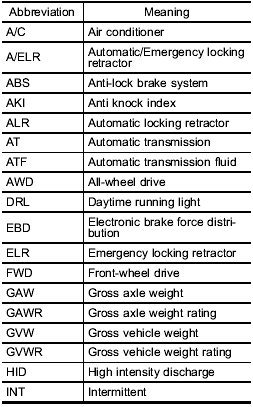
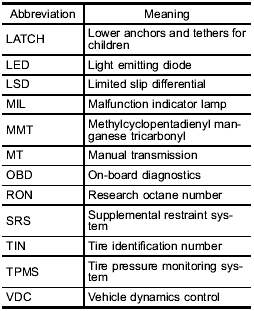
You will find several abbreviations in this manual. The meanings of the abbreviations are shown in the following list.
See also:
Cleaning aluminum wheels
● Promptly wipe the aluminum wheels clean of any kind of grime or agent. If dirt
is left on too long, it may be difficult to clean off.
● Do not use soap containing grit to clean the wh ...
SENSE AND STYLE
Family Friendly (Not Really, Fair, Great, Excellent): Not Really
Fun-Factor (None, Some, Good Times, Groove-On): Good Times ...
2008 Subaru Impreza review
The Subaru Impreza WRX is the rare type of car that combines year-round
drivability, day-to-day livability and reasonable comfort with versatility — and
is, all the while, a blast to drive. Along ...