


Checking the oil level
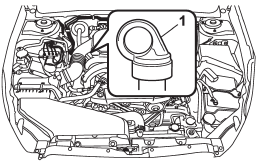
Non-turbo models
1) Yellow handle
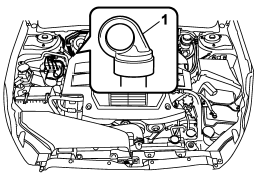
Turbo models
1) Yellow handle
Check the oil level monthly.
1. Park the vehicle on a level surface and stop the engine.
2. Pull out the level gauge, wipe it clean, and insert it again.
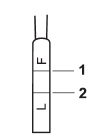
1) Upper level
2) Lower level
3. Pull out the level gauge again and check the oil level on it. If it is below the lower level, add oil through the level gauge hole to bring the level up to the upper level.
CAUTION
Be careful not to spill manual transmission oil when adding it. If oil touches the exhaust pipe, it may cause a bad smell, smoke, and/or a fire. If oil gets on the exhaust pipe, be sure to wipe it off.
See also:
Tires
WARNING
Never tow a trailer when the temporary spare tire is used. The temporary spare
tire is not designed to sustain the towing load. Use of the temporary spare tire
when towing can result in f ...
Driving tips for AWD models
All-Wheel Drive distributes the engine
power to all four wheels. AWD models
provide better traction when driving on
slippery, wet or snow-covered roads and
when moving out of mud, dirt and ...
Locking the doors
Press the “” button to lock all doors
and rear gate (Outback). An electronic chirp will sound once and the turn signal
lights will flash once.
If any of the doors (or the rear gate/trunk lid) i ...