


Removing and reinstalling clips
Removing clips
There are several types of clips used for your vehicle
Type A clips
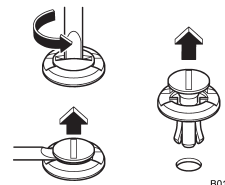
1. Turn the clips counterclockwise using a flat-head screwdriver until the center portion of the clip is raised.
2. Remove the clips with a flat-head screwdriver using leverage.
Type B clips
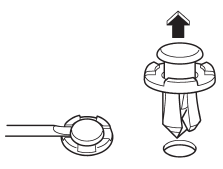
1. Pull out the center portion of the clip using a flat-head screwdriver as shown in the illustration.
2. Pull the protruded center portion to remove the entire body of the clip.
Type C clips
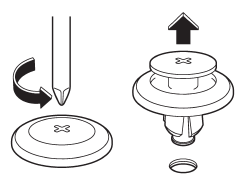
1. Turn the clip counterclockwise using a Phillips screwdriver until the center portion of the clip is raised.
2. Remove the entire clip by pulling it up.
Reinstalling clips
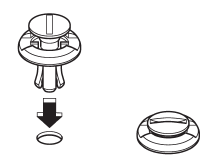
Type A clips
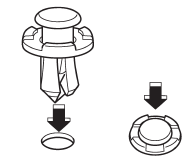
Type B clips
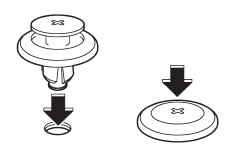
Type C clips
Insert the clip without the center portion first and then push the center portion of the clip into the hole.
See also:
Temperature control dial
Temperature control dial
To increase the temperature setting, turn
the temperature control dial clockwise. To
decrease the temperature setting, turn the
dial counterclockwise.
Each temperatu ...
Drugs and driving
There are some drugs (over the
counter and prescription) that can
delay your reaction time and impair
your perception, judgment and attentiveness.
If you drive after taking
them, it may i ...
Front fog light switch (if equipped)
Front fog light switch (if equipped)
The front fog lights operate only when the
low beam headlights are illuminated.
However, the front fog lights turn off when
the headlights are switched t ...