


Clock
NOTE
Your SUBARU dealer can change the settings of activating/deactivating the automatic adjustment of the clock by the GPS (Global Positioning System) (for models with the genuine SUBARU navigation system). Contact your SUBARU dealer for details.
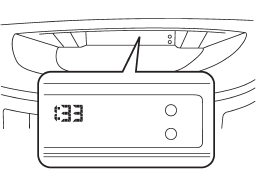
The clock shows the time while the ignition switch is in the “Acc” or “ON” position.
To adjust the time shown by the clock, press the “+” button or the “−” button. If you press the “+” button, the indicated time will change in one-minute increments. If you press the “−” button, the indicated time will change in one-minute decrements. If you keep the button pressed, the rate at which the indicated time changes will speed up.
See also:
FM reception
Although FM is normally static free, reception can be affected by the surrounding area, atmospheric conditions, station strength and transmitter distance. Buildings or other obstructions may cause mom ...
With SAT mode selected
Press the “” button to skip
forward in the channel order. Press the “” button
to skip backward in the channel order.
The channel will be shown on the audio display. ...
Selecting phone
To select the registered cell phone for
connecting to the in-vehicle equipment,
perform the following procedure.
1. Select the “SELECT PHONE” menu. If
no cell phones are registered, “EMPTY” is ...