


Instrument panel
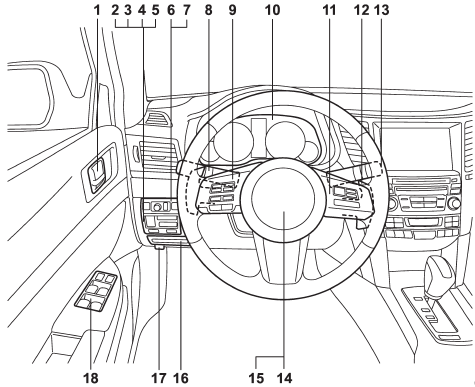
1) Door locks (page 2-4)
2) Electronic parking brake switch (page 7-34)
3) Hill Holder switch (page 7-36)
4) Trunk lid opener switch (page 2-24)
5) Vehicle Dynamics Control OFF switch (page 7-31)
6) Remote control mirror switch (page 3-51)
7) Illumination brightness control (page 3-30)
8) Light control switch (page 3-27)
9) Audio control buttons (page 5-31)
10) Combination meter (page 3-5)
11) Cruise control (page 7-38)
12) Paddle shift (page 7-22)
13) Wiper control lever (page 3-31)
14) Horn (page 3-52)
15) SRS airbag (page 1-38)
16) Fuse box (page 11-46)
17) Hood lock release knob (page 11-7)
18) Power windows (page 2-20)
See also:
Battery drainage prevention function
If a door or the rear gate is not completely
closed, the interior lights will remain
illuminated as a result. However, several
lights are automatically turned off by the
battery drainage preve ...
Manual tuning
Turn the “TUNE/TRACK/CH” dial clockwise to increase the tuning frequency and
turn the “TUNE/TRACK/CH” dial counterclockwise to decrease it.
Each time the dial is turned, the frequency interval ca ...
Breaking-in of new brake pads and linings
When replacing the brake pad or lining,
use only genuine SUBARU parts. After
replacement, the new parts must be
broken in as follows. ...